In This Guide
What Is a Script Breakdown?
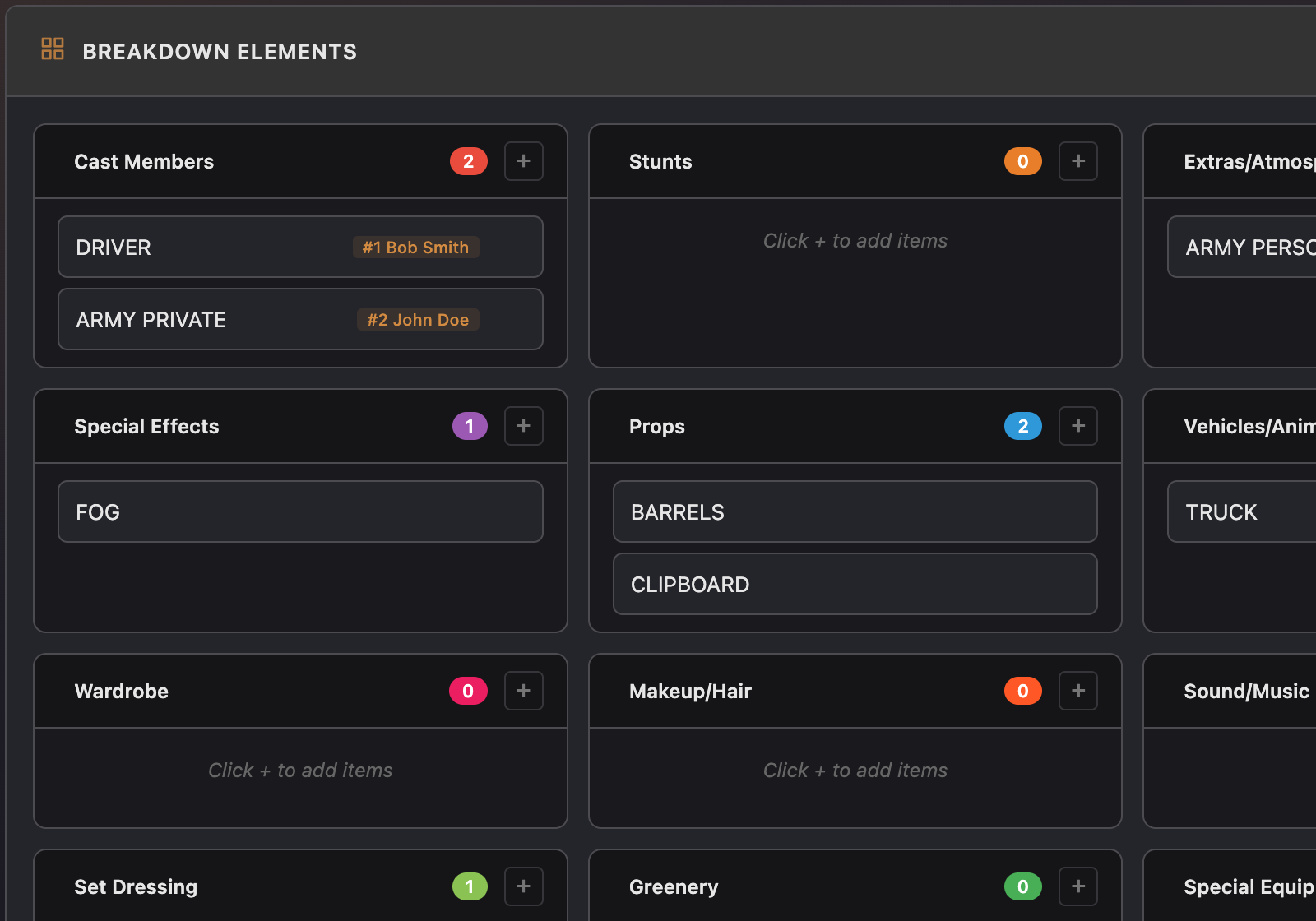
A script breakdown is a systematic, scene-by-scene inventory of everything your production needs. For each scene, you read through the text and tag every element — cast members, props, wardrobe pieces, vehicles, special effects, stunts, animals, special equipment — anything that someone on the production team needs to source, prepare, or bring to set.
The result is a breakdown sheet for each scene: a structured list of elements organized by category. When you're done breaking down the entire script, you have a comprehensive picture of what the production requires — which feeds directly into scheduling, budgeting, and call sheet generation.
On large productions, the breakdown is the responsibility of the 1st AD and the production manager. On indie sets, it's usually the director, producer, or whoever is wearing the most hats. Either way, the process is the same: read every line of every scene and ask yourself, "What does this require?"
Why Breakdowns Matter
The breakdown is the connective tissue between the script and the production. Without it, scheduling is guesswork — you don't know which scenes require the same actor, which locations need the same set dressing, or which days need special equipment. Budgeting is guesswork too — you can't estimate costs for props, wardrobe, and effects if you haven't identified what you need.
Breakdowns also surface problems early. A scene that casually mentions "a crowd gathers in the street" has major implications for extras, permits, traffic control, and sound. On the page, it's half a sentence. In the breakdown, it's a production challenge you can plan for — or rewrite to avoid.
Most importantly, breakdown data flows downstream. When you build the shooting schedule, the breakdown tells you which cast members are needed for each scene, which determines shooting order. When you generate call sheets, the breakdown provides the props, wardrobe, and special requirements for each day. The accuracy of everything that follows depends on how thoroughly you break down the script.
Breakdown Categories and Color Coding
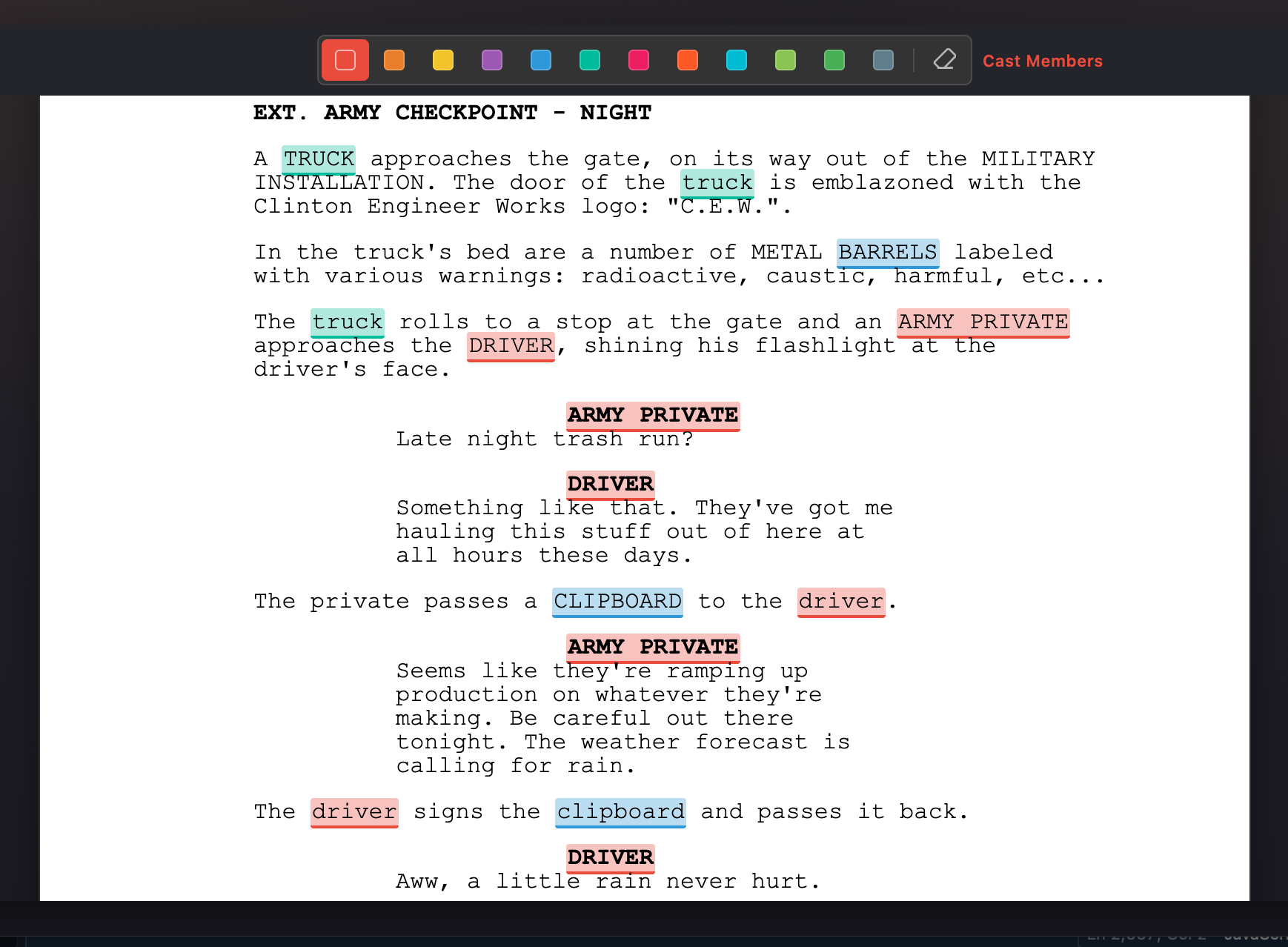
The film industry uses a standard set of breakdown categories, each assigned a specific color. This color coding originated with Entertainment Partners (EP) and has become the universal convention. Using standard colors means anyone in the industry who looks at your breakdown will instantly understand the organization.
Cast Members — Red
Every character who appears in the scene, including speaking roles, non-speaking roles, and featured extras. Cast is the single most important category for scheduling — actor availability drives the entire shooting order.
Extras / Background — Green
Background performers who populate the scene but don't have lines. The number of extras affects crew size, catering, and wardrobe requirements. Even a "small" crowd scene might need 20 extras with wardrobe, makeup, and holding areas.
Props — Purple
Any object that a character physically interacts with — a gun, a letter, a coffee cup, a phone. If an actor touches it or refers to it directly, it's a prop. Set dressing (objects that exist in the scene but aren't handled) is a separate category.
Wardrobe — Orange
Specific clothing requirements beyond what a character would normally wear. Period costumes, uniforms, damaged clothing, or any wardrobe that needs to be sourced or modified. If a scene calls for a character in a wedding dress, that's a wardrobe tag.
Vehicles — Pink
Any car, truck, motorcycle, bicycle, or other vehicle that appears in the scene. Vehicles often need to be picture-ready (clean, specific color, specific era), and driving scenes have additional safety requirements.
Special Effects — Blue
Practical effects that happen on set — rain, fog, fire, explosions, breakaway glass, squibs, smoke. These require special equipment, safety personnel, and often permits. Don't confuse this with visual effects (VFX), which are added in post-production.
Additional Categories
The standard set also includes categories for stunts (red/orange), animals (yellow), set dressing (brown/tan), makeup/hair (white), sound effects/music (gray), special equipment (teal), and production notes. Not every production uses every category — use the ones that are relevant to your script.
Breaking Down a Scene, Step by Step
1. Read the Scene Completely
Before tagging anything, read the entire scene through. Understand what happens, who's involved, and where it takes place. You'll miss elements if you try to tag on a first read — context matters for identifying implied requirements.
2. Start with Cast
Identify every character who appears in the scene — not just those with dialogue. A character who is described as "sitting in the corner" still needs to be on set that day. Cast drives scheduling, so get this right first.
3. Work Through the Action
Go through the scene line by line, focusing on the action descriptions. Every noun is a potential element: "She grabs the phone" means you need a phone (prop). "Rain streams down the window" means you need rain (special effects) or stock footage. "He pulls up in a 1967 Mustang" means you need a specific vehicle.
4. Check the Dialogue
Dialogue can imply elements that aren't in the action lines. A character saying "hand me that knife" tells you there's a prop even if the action description doesn't mention it. A character saying "nice dress" might imply a specific wardrobe piece.
5. Note the Implied Requirements
Some elements are implied by the scene heading or context rather than stated explicitly. An exterior night scene implies lighting equipment. A restaurant scene implies background extras, table settings (set dressing), and food (props). A hospital scene implies wardrobe for medical staff. Train yourself to think about what the scene requires beyond what's written on the page.
6. Fill in the Breakdown Sheet
Organize the tagged elements by category. Each scene gets its own breakdown sheet showing every element needed. Include the scene number, scene heading (INT/EXT, location, time of day), page count (in eighths), and a brief synopsis alongside the categorized elements.
Tip: Break down every scene in the script before you start scheduling. It's tempting to break down scenes as you go, but you'll miss continuity issues — a prop that appears in scene 5 and scene 40, a wardrobe change that happens between consecutive scenes, a vehicle that's needed on two different days at two different locations. The full picture matters.
Common Mistakes
Missing Implied Elements
The biggest mistake is only tagging what's explicitly written in the screenplay. Scripts are not production documents — they describe the story, not the logistics. A scene set in a "busy diner" implies extras, table settings, food, a location with kitchen capabilities, and probably ambient sound design. The script might only say "busy diner."
Inconsistent Cast Tracking
A character might be referred to differently in different scenes — by first name, last name, or description ("the bartender," "Maria," "Maria Rodriguez"). Make sure you're tracking them as the same character across the entire script, or your schedule will treat them as different people.
Ignoring Continuity
If scene 12 ends with a character getting coffee and scene 15 continues in the same location, that coffee cup needs to be present and at the same fill level in both scenes. Breakdown sheets should note continuity-sensitive props and wardrobe so the script supervisor can track them.
Over-Breaking or Under-Breaking
On one extreme, you tag every noun in the script including things that are clearly set dressing with no special requirements. On the other, you only tag the obvious items and miss critical elements. The right level of detail depends on your production's scale, but the rule of thumb is: if someone on your team needs to do something to make this element appear on screen, it goes in the breakdown.
From Breakdowns to Schedule
Once every scene is broken down, you have the raw data needed to build a shooting schedule. The most critical piece is the cast list per scene — because actor availability is almost always the primary constraint on shooting order.
The 1st AD (or on an indie production, whoever is scheduling) takes the breakdown data and starts grouping scenes: all scenes at the same location, all scenes with the same cast combination, all exteriors that depend on weather or daylight. The goal is to minimize company moves, maximize the use of each actor's time on set, and avoid setups that require expensive equipment on more days than necessary.
The breakdown also tells the schedule how complex each scene is. A scene with five cast members, a vehicle, special effects rain, and specific wardrobe requirements takes more time to prep and shoot than a simple two-person dialogue scene in a living room. This complexity assessment — sometimes formalized as a difficulty or complexity score — helps balance the schedule so no single day is overloaded.
In a connected workflow, breakdown data populates the stripboard automatically. Each scene strip on the board carries its cast requirements, page count, and element tags. When you drag a scene to a different day, the schedule knows which actors are needed and can flag conflicts. When you generate a call sheet for that day, the breakdown data provides the props, wardrobe, and special requirements — no re-entry needed.